BECE Basic Science 2022 Objective — Question 1
Question 1 of 120 from the Basic Education Certificate Examination (Junior WAEC) (BECE) Basic Science 2022 Objective paper, with the correct answer and a full explanation.
Advertisement
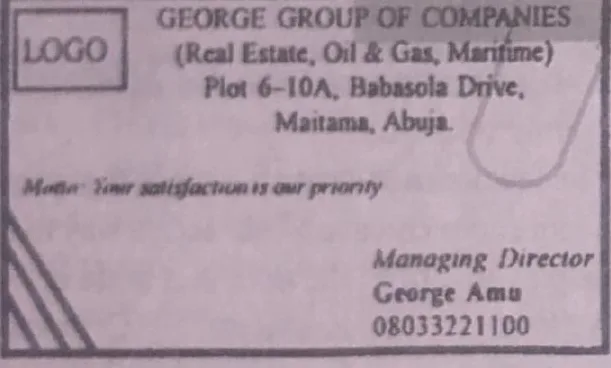
PAPER III - COMPUTER STUDIES PRACTICAL Using CorelDraw, design your own business card from the prototype shown (George Group of Companies). i. Draw a rectangle for the card. ii. Replace the company name with your own name in Times New Roman, 18 pt, bold. iii. Replace the services listed with your own services. iv. Replace the address with your own address. v. Draw a logo box and place a logo of your choice in it. vi. Type the motto in Tahoma, 10 pt. vii. Replace "George Amu" with your full name in bold. viii. Replace the phone number with your registration number. ix. Save the work and print it.
Model answer
1. Open CorelDraw and create a new document. 2. Choose the Rectangle tool and drag to draw the card outline. 3. With the Text tool type your name, select it, set Times New Roman, 18 pt and press Ctrl + B for bold. 4. Type your services below the name, replacing those on the prototype. 5. Type your own address in the address area. 6. Draw a small box (logo box) at the top corner and place your logo or a simple shape in it. 7. Type the motto, select it and set Tahoma, 10 pt. 8. Replace "George Amu" with your full name and make it bold. 9. Replace the phone number with your registration number. 10. Save with File > Save, give it a name, then print with File > Print.
Advertisement
Sign up free to unlock
- Score tracking
- Practice history
- Saved questions
- Progress dashboard
- Personalized sessions
- Weak-topic breakdown
…and/or go further with premium services and No Ads.