BECE Basic Science 2024 Theory — Question 1
Question 1 of 4 from the Basic Education Certificate Examination (Junior WAEC) (BECE) Basic Science 2024 Theory paper, with the correct answer and a full explanation.
Advertisement
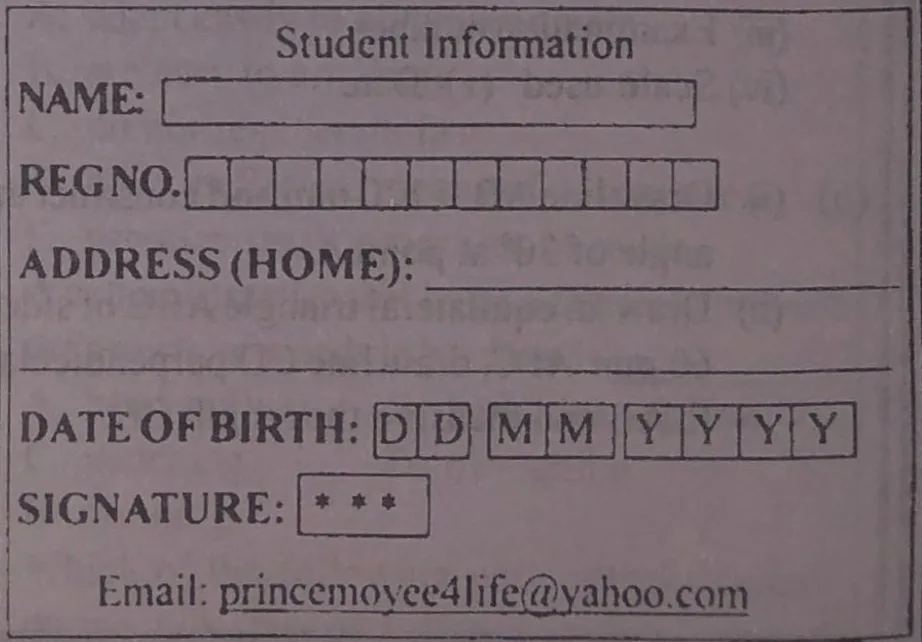
PAPER III - COMPUTER STUDIES PRACTICAL Instructions: (i) Use computer system to answer the question. (ii) You are required to print out the hard copy(ies) of your work. (iii) No content of the candidates' work should be the same. Using CorelDraw, reproduce the student card with Calibri typeface and font point 24 throughout except otherwise stated. Application: i. Using font point 36, format "Student Information" as Personal Information in uppercase and embolden. ii. Key in your full name in the space provided for "NAME" in upper case. iii. Key in your registration number in the space provided "REG NO". iv. For "ADDRESS (HOME)", supply your home address in the space provided and italicize it. v. Input your date of birth in the space marked "DD MM YYYY" as follows: DD for day, MM for month and YYYY for year. vi. Replace the "***" in the signature box with the first five digits of your registration number. vii. Type in any valid email address to replace "princemoyee4life@yahoo.com". viii. Print out your work in landscape orientation.
Model answer
1. Open CorelDraw and create a new document. Set the page orientation to Landscape. 2. Draw the large outer rectangle (Rectangle tool) and the inner boxes: the NAME box, the REG NO row of 11 small boxes, the DOB boxes (2 for DD, 2 for MM, 4 for YYYY) and the SIGNATURE box. Draw the lines for ADDRESS (HOME). 3. Set the Text tool to Calibri, 24 pt, and type the labels NAME:, REG NO., ADDRESS (HOME):, DATE OF BIRTH:, SIGNATURE:, and the email line. 4. Type STUDENT INFORMATION in uppercase (as PERSONAL INFORMATION heading), select it, set the size to 36 pt and apply Bold. 5. Type your full name in capital letters in the NAME box. 6. Type the registration number into the REG NO boxes, one character per box. 7. Type your home address on the address lines and press Ctrl + I to italicize it. 8. Type the day (DD), month (MM) and year (YYYY) of birth in the DOB boxes. 9. Replace *** in the signature box with the first five digits of your registration number. 10. Replace the sample email with your own valid email address. 11. Choose File > Print, make sure the orientation is Landscape, and print the hard copy.
Advertisement
Sign up free to unlock
- Score tracking
- Practice history
- Saved questions
- Progress dashboard
- Personalized sessions
- Weak-topic breakdown
…and/or go further with premium services and No Ads.