Computer Studies 2021 Theory — Question 1
1(a). What is a Report in a database system?
Model answer
A report is a database object that is used to present information from a database, for the purpose of displaying or distributing a summary of data.
All 11 questions from the West African Examinations Council (WAEC) Computer Studies 2021 Theory paper, with the correct answer and a full explanation for each. Free, no signup needed.
Advertisement
1(a). What is a Report in a database system?
Model answer
A report is a database object that is used to present information from a database, for the purpose of displaying or distributing a summary of data.
1(b). List four ways in which Reports can be viewed in a database management system.
Model answer
Design view; Report view; Layout view; Print preview.
1(c). Outline the steps to print a Report in MS Access.
Model answer
Right-click on the report name on the navigation pane → click Print Preview → click Print/CTRL+P → click OK. (Alternative: select the report on the navigation pane → click Print Preview → click Print/CTRL+P → click OK.)
2. Perform the following conversions in the stated number bases: (a) AB1₁₆ to Octal system; (b) 1110111.101₂ to Denary (decimal) system; (c) 507₈ to Binary system.
Model answer
(a) AB1₁₆ = A×16²+B×16¹+1×16⁰ = 10×256+11×16+1 = 2560+176+1 = 2737₁₀. Converting 2737 to octal by repeated division by 8: 2737÷8=342 r1; 342÷8=42 r6; 42÷8=5 r2; 5÷8=0 r5. Reading remainders bottom-up: 5261₈. (b) 1110111.101₂ = (1×2⁶+1×2⁵+1×2⁴+0×2³+1×2²+1×2¹+1×2⁰) + (1×2⁻¹+0×2⁻²+1×2⁻³) = (64+32+16+0+4+2+1) + (0.5+0+0.125) = 119 + 0.625 = 119.625₁₀. (c) 507₈ converts first to decimal: 5×64+0×8+7×1 = 320+0+7 = 327₁₀, then to binary: 327 = 101000111₂.
3(a). (i) What is a Universal Serial Bus (USB)? (ii) State two benefits of a USB connection between a computer and another device.
Model answer
(i) USB (Universal Serial Bus) is the most popular hardware interface/connection standard used to connect a computer to devices such as digital cameras, printers, scanners, and external hard drives, among others. It is also used for charging portable devices and provides both data transmission and low-voltage power over a single cable. (ii) Any two: it can be used to charge devices; it supports fast data transfer; it provides low-voltage (5V) power through a single cable; no external power source is needed; it has low power consumption.
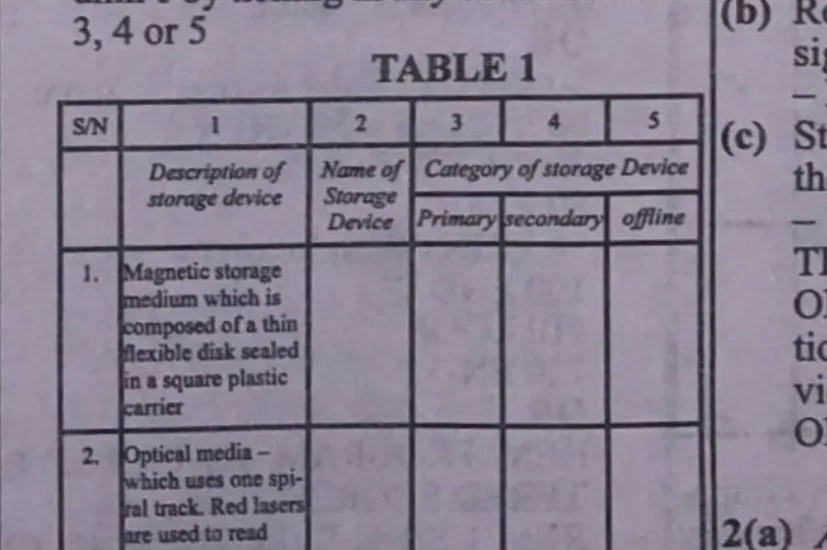
3(b). In Table 1, three storage devices are described. Use it to answer 3(b)(i) and 3(b)(ii): (i) in column 1, identify the storage device by ticking in any of columns 3, 4 or 5; (ii) state the category of each storage device.
Model answer
Table 1 describes three storage devices by their characteristics — e.g. row 3 describes a 'Non-volatile memory chip which [its] contents cannot be altered; it is often used to store the start-up routines in a computer (e.g. the BIOS)' — this identifies the device as ROM (Read-Only Memory), categorised as primary storage. Students identify each row's device name and mark (tick) its correct storage category (primary/secondary/offline) in the corresponding column.
4(a)(i). Define computer graphics.
Model answer
Computer graphics is the creation, manipulation, and storage of pictures/geometric objects (modelling) and their images (rendering) with the help of a computer — the art of drawing pictures, lines, charts and other graphical images using specialized computer programs/applications.
4(a)(ii). State two applications of computer graphics in advertising.
Model answer
Any two of: animation/motion pictures; business cards; branding; billboards; flyer/flex creation; posters; modelling/design; digital marketing; pitching for projects; print media adverts; TV commercials; banners; logo design; letter-heads; presentations; postcards; infographics; brochures; vehicle wraps; signage and trade show displays; email marketing templates.
4(b). Give one use of each of the following computer graphics application tools: (i) Interactive Fill Tool; (ii) Texture Fill Tool; (iii) Envelope Tool; (iv) Extrude Tool.
Model answer
(i) Interactive Fill Tool: used to create a fill dynamically by using markers in the drawing window and a property bar, to change the angle, midpoint, and colour of an object/image. (ii) Texture Fill Tool: used to apply preset texture fills to objects to create the illusion of a variety of textures, such as water, clouds, and stone. (iii) Envelope Tool: lets the user reshape an object by dragging the nodes or points around the envelope. (iv) Extrude Tool: lets the user apply the illusion of depth to objects — it projects surfaces from an object to give it a 3-dimensional shape/appearance.
4(c). Name one Fill Tool in computer graphics application which is needed to: (i) create a background that is faded from light blue to white; (ii) fill an object with two colours that blend from one to another.
Model answer
(i) Any one: Interactive Fill Tool; Fountain Fill Tool; Transparency Tool. (ii) Any one: Interactive Fill Tool; Fountain Fill Tool; Two-colour Pattern Fill Tool.
5. Write a BASIC program to grade any score entered from the keyboard as either 'Poor' for a score that is below 50% or 'Satisfactory' for a score that is equal to or above 50%. The program execution should stop as soon as a score that is less than zero is entered.
Model answer
10 REM program to grade entered scores 20 CLS 30 Score = 0 40 DO UNTIL Score < 0 50 INPUT "Enter a score:"; Score 60 IF Score < 50 THEN 70 PRINT "Poor" 80 ELSE 90 PRINT "Satisfactory" 100 END IF 110 LOOP 120 END (Alternative, using SELECT CASE): DIM Score AS INTEGER DO UNTIL Score < 0 INPUT "Enter a score:"; Score SELECT CASE Score CASE 50 TO 100 PRINT "Satisfactory" CASE 0 TO 49 PRINT "Poor" END SELECT LOOP END
Advertisement
…and/or go further with premium services and No Ads.