All 6 questions from the West African Examinations Council (WAEC) Computer Studies 2025 Theory paper, with the correct answer and a full explanation for each. Free, no signup needed.
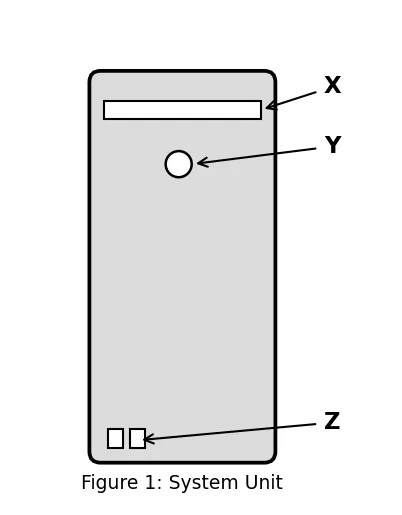
The diagram in Figure 1 is the system unit of a computer.
(a) Identify the parts labelled: (i) X (ii) Y (iii) Z
(b) State one use of the parts labelled: (i) X (ii) Y (iii) Z
(c) List four internal components of the system unit shown in Figure 1.
Model answer
(a) (i) X — Optical (CD/DVD) drive (ii) Y — Power button (iii) Z — USB ports
(b) (i) X — Used for reading from or writing to a CD/DVD (ii) Y — Used to turn the computer on or off (iii) Z — Used to connect external devices like flash drives, keyboards and printers to the system
(c) Any four: (i) Central Processing Unit (CPU) (ii) Random Access Memory (RAM) (iii) Motherboard (iv) Fan (v) Network Interface Card (NIC) (vi) Hard drive
(a) What is word processing?
(b) Explain the following features of MS Word:
(i) Watermark (ii) Thesaurus (iii) Drop cap (iv) Find and Replace
Model answer
(a) Word processing is the creation, editing, formatting and printing of text-based documents using computer software (e.g. Microsoft Word, WordPad, WordPerfect). OR: It is the manipulation of text, documents and formatting to produce a professional-looking document.
(b) (i) Watermark: a faint, semi-transparent image or text appearing behind the main content of a document, often used for copyright, branding or reflecting document status.
(ii) Thesaurus: a tool in word processors that provides synonyms and antonyms for selected words.
(iii) Drop cap: a large initial letter that extends down two or more lines of body text at the beginning of a paragraph/selection.
(iv) Find and Replace: a feature that allows the user to search for specific words or phrases within a document and optionally replace them with other word(s) or phrase(s).
(a) Describe the computer keyboard.
(b) List four types of keys on a computer keyboard.
(c) State the function of each of the following shortcut key combinations: (i) Shift + Delete (ii) Alt + F4
(d) Name the shortcut key combination for performing the following tasks: (i) highlighting an entire text in a document (ii) previewing a document before printing
Model answer
(a) The computer keyboard is an input device made up of a set of keys arranged in a specific layout. Each key corresponds to a particular character, number or function, and when pressed, sends a signal to the computer. It is the primary means of entering text, commands and data into a computer.
(b) Any four: Alphanumeric keys, Function keys, Modifier keys, Navigation keys, Numeric keypad.
(c) (i) Shift + Delete: This permanently deletes the selected item without sending it to the Recycle Bin.
(ii) Alt + F4: This closes the current active window or program.
(d) (i) Ctrl + A — highlights/selects the entire text in a document. (ii) Ctrl + P — previews a document before printing.
Write a program in QBASIC to calculate the total and average scores in five subjects taken by each of ten students in a class. The scores of the ten students should be read from the keyboard.
Model answer
10 CLS
20 FOR Student Number = 1 TO 10
30 Student Total Score = 0
40 PRINT "Student Number:"; Student Number
50 FOR Subject Number = 1 TO 5
60 INPUT "Enter score for subject "; Subject Number; ":"; Subject Score
70 Student Total Score = Student Total Score + Subject Score
80 NEXT Subject Number
90 Student Average Score = Student Total Score / 5
100 PRINT "Total Score:"; Student Total Score
110 PRINT "Average Score:"; Student Average Score
120 NEXT Student Number
130 END
Advertisement
Sign up free to unlock
Score tracking
Practice history
Saved questions
Progress dashboard
Personalized sessions
Weak-topic breakdown
…and/or go further with premium services and No Ads.